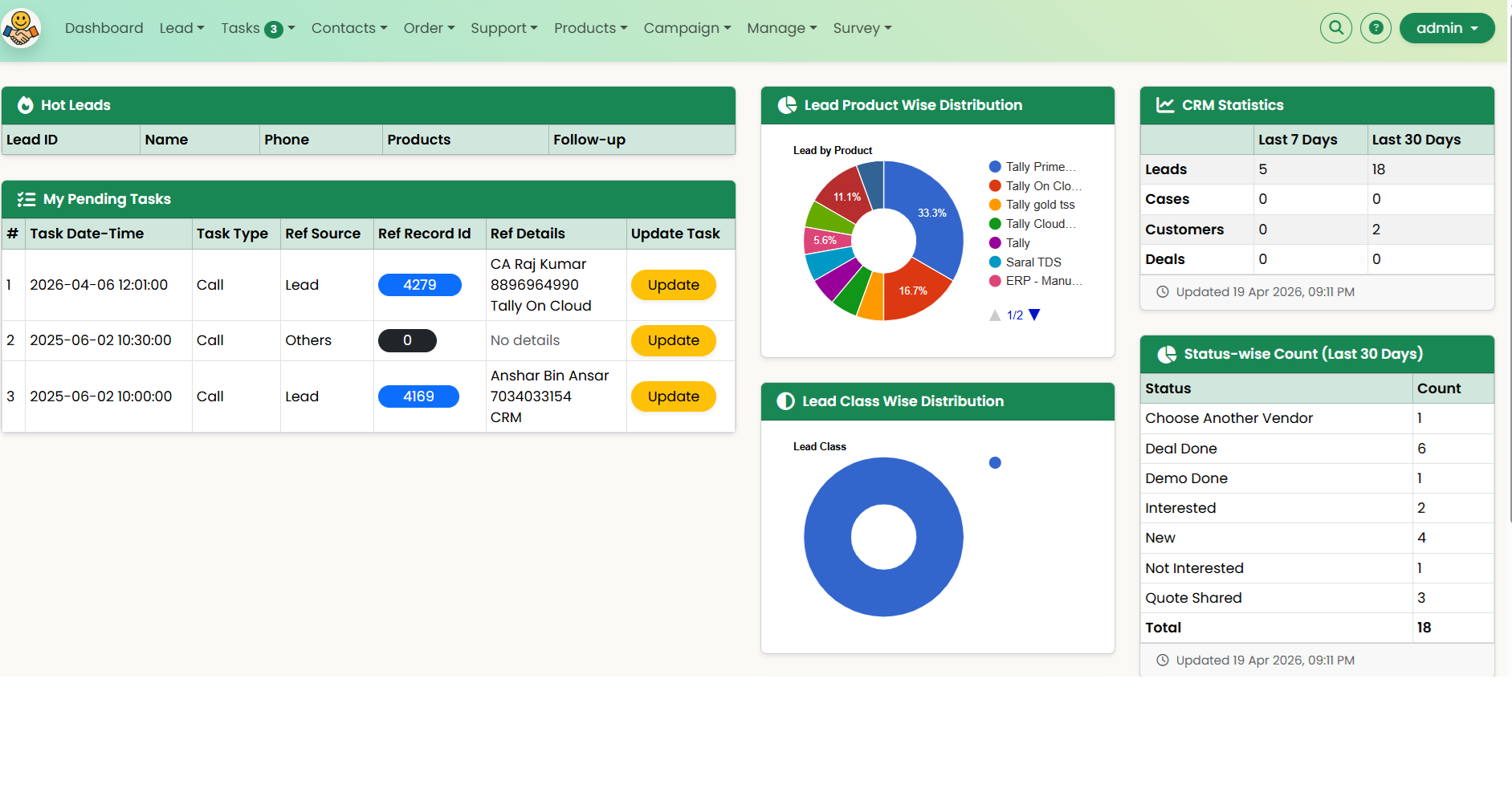
Euphoria CRM Usage

Euphoria CRM Logo Euphoria CRM - Cloud Based Solution

Lead Management + Help Desk + AMC + Customer Feedback Surveys (CSAT/NPS)
Lead Pipeline

Capture → Assign → Follow-up → Close

Quotations

Generate + PDF share

Help Desk + AMC

Support tickets + renewals

Survey Feedback

CSAT/NPS via Email/SMS

Major Functionalities

Euphoria CRM helps you manage leads, customer communication, service requests, and renewals in one place.

  • Lead Management: Capture leads, qualify, score, nurture, and track conversions.
  • Quotation Management: Create multiple quotations per lead, export PDFs, and share with customers.
  • Customer Data Management: Maintain customer profiles and usage patterns.
  • Order Management: Record orders, manage status, and track payment receipts.
  • Complaint Management / Help Desk: Log support requests and ensure closure.
  • AMC / Contract Management: Manage AMCs and ensure timely renewals.
  • Sales Team Management & Tracking: Assign targets and track performance on web + mobile.
  • Task Management & Reminders: Follow-up reminders and planned meeting scheduling.
  • Customer Feedback Survey Module: Create CSAT/NPS surveys, send invites via Email/SMS, and track responses.
    Use after: Deal closure / Ticket closure / AMC renewal / Training completion.

Detailed Functionalities:

Lead Management

Lead Management

Lead entry via web interface or mobile app. Lead follow-up, assignment, and categorization as Cold, Warm, and Hot.

Send Quotation

Send Quotation

Generate and send quotations to leads and customers via email and SMS.

Task Management & Reminder

Task Management & Reminder

Provide reminders for upcoming tasks and tasks to be done today.

Sales/Deal Closure

Sales/Deal Closure

Record deals/sales and attribute them to customers and the sales team.

Contact Management

Contact Management

Enter contact data with options to convert to lead and follow-up for sales closure.

Customer Management

Customer Management

Record customer data and profiles based on geo-location and business segments, helping to run marketing campaigns.

Product and Services Management

Product and Services Management

Provide products and services that can be availed by customers and that the sales team should focus on selling.

Manage Sales Team

Manage Sales Team

View sales team progress. Add and delete resources. Log and maintain work/task reports.

Sales Tracking

Sales Tracking

Real-time tracking of sales data. Web and mobile platforms provide smart access to CRM from anywhere.

Lead Generation

Lead Generation

Maintain a database of prospects and contacts. SMS, tele-calling, and email campaigns for business growth.

Product Integration

Product Integration

CRM integrates with Tally for customer data imports. Customer data can also be exported to Tally. Email and SMS integration is available.

Customer Feedback Survey

Customer Feedback Survey

Create feedback surveys, send invite links via email/SMS, and track responses to measure customer satisfaction and improve retention.

Why CRM?

For any business, "Customer is King." Any successful business will fulfill customer needs and wants to their delight. The business will have complete information about the customer behavior.

CRM helps businesses build a relationship with their customers that, in turn, creates loyalty and customer retention. Since customer loyalty and revenue are both qualities that affect a company's revenue, CRM is a management strategy that results in increased profits for a business. CRM also helps measure customer satisfaction using feedback surveys and strengthens long-term retention.

At its core, a CRM tool creates a simple user interface for a collection of data that helps businesses recognize and communicate with customers in a scalable way.

Maintaining a CRM tool is the basis for a scalable sales and marketing system. Any company will benefit from maintaining a record of which conversations, purchases, and marketing materials can be associated with leads and customers.

A CRM tool helps in profiling customer attributes and purchase habits. If you are a starter, here are a few questions to ponder:

  1. Do you have customer data?
  2. Is customer data profiled?
  3. Can you view all purchase records in one go for a particular customer?
  4. How do you handle your repeat customer?
▣ CRM Terminology
▣ Euphoria CRM Setup Guide
▣ Euphoria CRM Lead Management User Guide
▣ Euphoria CRM Survey Management User Guide
▣ Sales Funnel Management (SPANCO)/Lead Life Cycle
▣Mastering the Five Stages of Lead Management with Innoforia’s Euphoria CRM
▣ Customer Life Cycle (CLC)

Industry Specific CRM

Generic B2B/B2C CRM

Invoicing, Payment Receipt

Real Estate CRM

Maintain Property Details, Requirement Matching

Education CRM

Student enrollment, fee collection and management

EUPHORIA CRM (Android App)

Link to App on Local Website: Euphoria CRM APP

Note for Device Settings:

Go to Settings -> Security and Privacy -> Install unknown apps -> Enable "My Files and Chrome (whichever browser you are using)"

Link to App on Google Play: Google Play

Privacy Policy

Access to the App: The app can be installed but can be used only if your organization uses Euphoria CRM and your admin has assigned access authority.

Data Collection: The data collected pertains to the sales process. It is stored on the cloud used by your organization. The app also displays CRM data. User login information is stored locally to avoid the need for repeated logins.

The app requests the following permissions:

  1. Internet Access and Network Connectivity: To save data on the cloud and check the status of network connectivity. (INTERNET, ACCESS_NETWORK_STATE)
  2. Device Location: To update the CRM about the location of the device. (ACCESS_COARSE_LOCATION, ACCESS_FINE_LOCATION). The location is used only when the app is active. No background process accesses the location data.
  3. Read Call Log: To show previous calls and assist in entering the data into CRM. (READ_CALL_LOG)
ABOUT US

Innoforia provides business automation solutions for business growth and operational efficiency. This includes CRM solutions, lead management, help desk, billing, and inventory solutions. The solutions are cloud-based. We also provide digital marketing and software engineering and support services.

GET IN TOUCH

+91-9540-283-283
+91-9999-283-283

ADDRESS

SRC E7-E8, Shipra Riviera,
Gyan Khand-3, Indirapuram,
Ghaziabad - 201014

© Innoforia Consulting 2018 All rights reserved.