Cloud Based CRM Solution

Euphoria CRM Logo
Innoforia Product Euphoria CRM

Euphoria CRM for lead tracking, quotations, support workflows, and survey feedback

Manage customer handling through a structured workflow from lead capture and qualification to quotation, sales order, delivery, and post-sale survey feedback.

  • ✓ Lead capture, qualification, assignment, and follow up tracking
  • ✓ Quotation, negotiation, acceptance, and sales order workflow
  • ✓ Help desk, AMC support, reminders, and customer feedback surveys
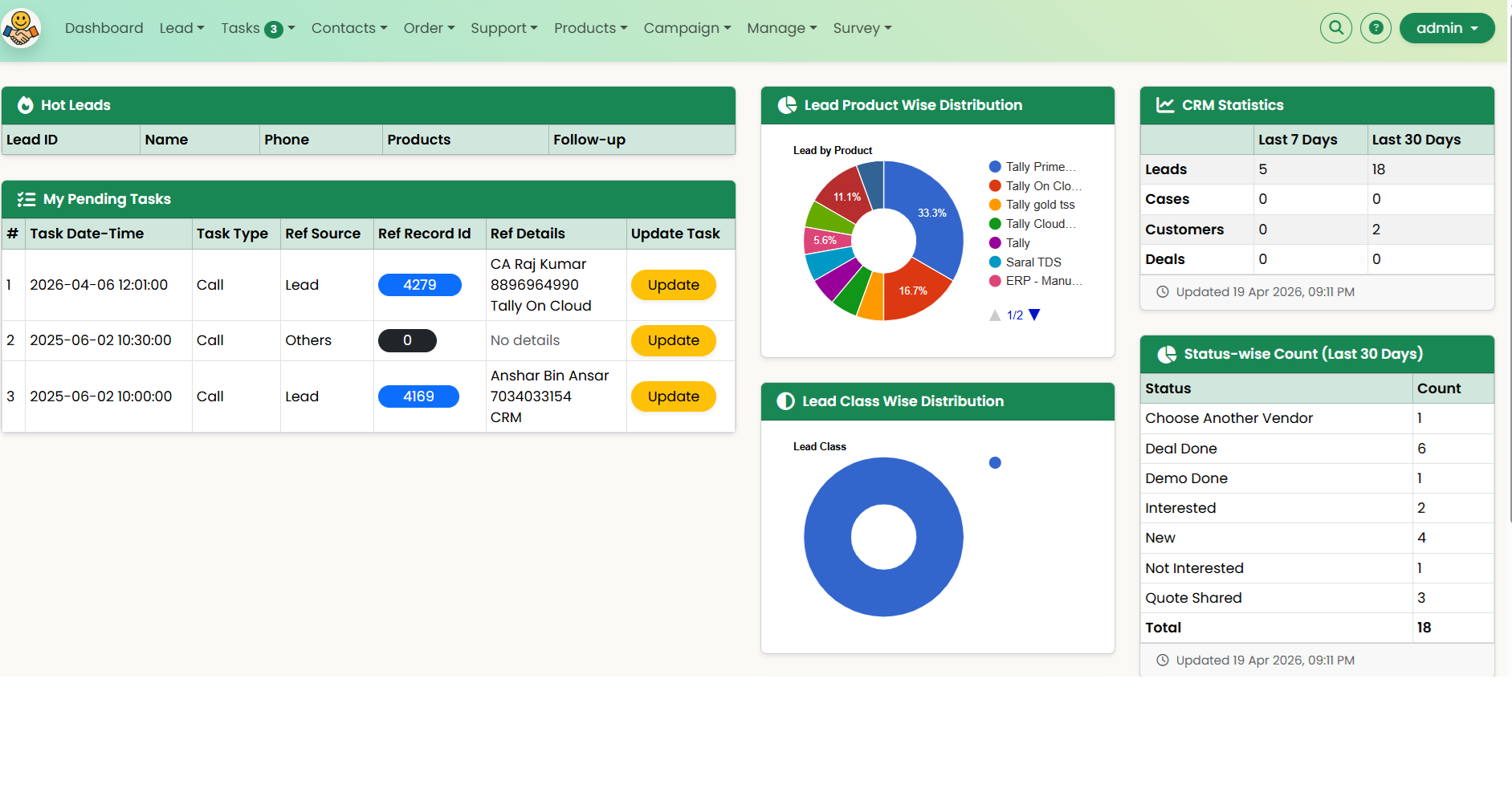
Euphoria CRM dashboard showing leads, tasks, charts, and CRM statistics

CRM Workflow

Lead Capture Qualification Assignment Follow Up Quotation Negotiation Acceptance Sales Order Delivery Survey Feedback
Assignment Alert

Notify the responsible user when a lead or task is assigned.

Upcoming Task Alert

Remind users about scheduled follow ups and planned actions.

Missed Task Alert

Highlight overdue tasks and missed follow up commitments.

Quotation Acceptance Alert

Notify the team when a quotation is accepted and the process moves to the next stage.

Quotation Review Request Alert

Prompt the prospect for quotation review when a response is still pending.

At a glance

What Euphoria CRM covers

A focused CRM platform that combines lead handling, quotations, support, renewals, and customer feedback instead of splitting them across disconnected tools.

Lead Pipeline

Capture, qualify, assign, follow up, and close leads in one flow.

Quotations

Create quotations, export PDFs, and share with prospects.

Help Desk + AMC

Track support tickets, complaints, contracts, and renewals.

Survey Feedback

Run CSAT and NPS surveys through Email or SMS invite links.

Core value

Major functionalities

Euphoria CRM helps businesses manage customer acquisition, service requests, renewals, and follow up discipline from one cloud-based system.

  • Lead Management: Capture leads, qualify, score, nurture, and track conversions.
  • Quotation Management: Create multiple quotations per lead, export PDFs, and share with customers.
  • Customer Data Management: Maintain customer profiles and usage patterns.
  • Order Management: Record orders, manage status, and track payment receipts.
  • Complaint Management / Help Desk: Log support requests and ensure closure.
  • AMC / Contract Management: Manage AMCs and ensure timely renewals.
  • Sales Team Management & Tracking: Assign targets and monitor performance on web and mobile.
  • Task Management & Reminders: Schedule follow ups, meetings, and pending work.
  • Customer Feedback Survey Module: Create CSAT/NPS surveys and track responses after closure, renewal, or training completion.
Modules

Detailed functionalities

These modules help teams handle customer acquisition, sales execution, communication, service, and retention more systematically.

Lead Management

Lead Management

Lead entry through web or mobile, with assignment, follow up, and Hot/Warm/Cold categorization.

Quotation Management

Quotation Management

Generate and send quotations to leads and customers for faster commercial follow up.

Task Management and Reminder

Task Management & Reminder

Track upcoming tasks, overdue tasks, and planned work for better follow up discipline.

Sales Deal Closure

Sales / Deal Closure

Record deals and sales while connecting them to the customer and sales team history.

Contact Management

Contact Management

Maintain contact data and convert suitable records into leads for structured sales tracking.

Customer Management

Customer Management

Maintain customer profiles by geography and segment to support campaigns and communication.

Product and Services Management

Product & Service Management

Maintain the product and service catalog used by sales teams for quotations and sales discussions.

Sales Team Management

Sales Team Management

Review team progress, maintain work reports, and track sales resource performance.

Sales Tracking

Sales Tracking

Review sales movement and activity through web and mobile access from anywhere.

Lead Generation

Lead Generation

Maintain prospect databases and support SMS, tele-calling, and email campaigns for growth.

Product Integration

Integrations

Integrate with Tally and connect email or SMS channels for practical customer communication workflows.

Customer Feedback Survey

Customer Feedback Survey

Create feedback surveys, send invite links, and track responses to improve retention and service quality.

Why CRM

Why businesses use CRM

CRM helps businesses organize their sales process in a way that improves the movement of leads towards sales orders. It reduces lead leakage, supports proper qualification, and creates a structured path from first contact to conversion. By bringing lead capture, qualification, assignment, follow up, quotation, negotiation, and closure into one system, CRM helps teams track pending actions, monitor pipeline movement, and reduce missed opportunities. This improves discipline in the sales process and gives management better visibility into how prospects are progressing.

CRM is also important for customer retention and long term growth. When a business can view customer history, preferences, past purchases, complaints, renewals, and ongoing communication together, it can respond faster, serve better, and build stronger relationships. Over time, this improves repeat business, renewal rates, service quality, and customer satisfaction. In that sense, CRM is not only a sales tool, but a system that helps businesses manage both conversion and customer retention in a more structured way.

Fit by industry

Industry specific CRM use cases

Euphoria CRM can support different workflows depending on the industry and customer journey.

Generic B2B / B2C CRM

Suitable for lead handling, invoicing, payment receipt, follow up, and customer management workflows.

Real Estate CRM

Supports property details, lead tracking, customer requirement mapping, and matching workflows.

Education CRM

Useful for student lead handling, enrollment process, fee tracking, and communication workflows.

Android app

Euphoria CRM app

The Android app supports field and on-the-go usage for organizations already using Euphoria CRM.

Local APK: Download Euphoria CRM App

Google Play: View on Google Play

Device note:

Go to Settings → Security and Privacy → Install unknown apps → enable access for the browser or file manager being used.

App privacy & permissions

The app is usable only for organizations authorized to use Euphoria CRM. User login data may be stored locally to avoid repeated login prompts.

  • Internet & network access: Used to save and retrieve CRM data from the cloud.
  • Location access: Used only while the app is active to update CRM with device location.
  • Read call log: Used to help users reference previous calls for CRM entry support.

Want to see Euphoria CRM in action?

Whether you need lead tracking, quotation workflows, service ticket handling, AMC renewals, or customer feedback surveys, Euphoria CRM can be configured around your business process.